概述
SQLite是一个进程内库,它实现了一个自足的、无服务器的、零配置的、事务性的SQL数据库引擎。SQLite的代码在公共领域,因此可以免费用于任何目的,无论是商业还是私人。SQLite是世界上部署最广泛的数据库,其应用数量之多,我们无法统计,其中包括几个备受瞩目的项目。
(这个数据库非常小,只有几百kb,且易于安装,非常适合练习和做小项目使用)
1.安装SQLite
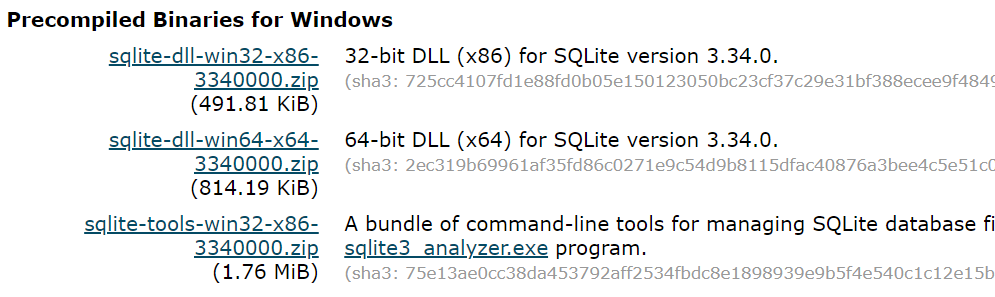
去官方页面下载SQLite,需要下载 sqlite-tools-win32-*.zip 和 sqlite-dll-win32-*.zip 压缩文件。(dll的64位应该也可以用)
 20201208085105
博主现在使用的是3.34的版本
并在此文件夹下解压上面两个压缩文件,将得到 sqlite3.def、sqlite3.dll 和 sqlite3.exe 文件,把对应文件的位置添加到环境变量Path。
打开cmd,使用 sqlite3 命令,将显示如下结果
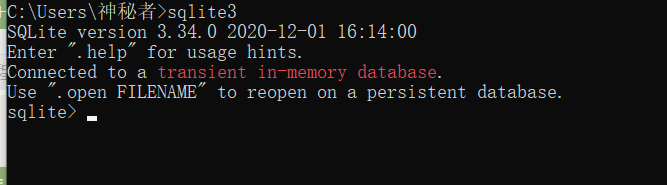 image-20201208085422762
注:红色的英文的意思是:连接到一个内存中的临时数据库
2.连接SQLite
在 Java 程序中使用 SQLite 之前,我们需要确保机器上已经有 SQLite JDBC Driver 驱动程序和 Java。可以查看 Java 教程了解如何在计算机上安装 Java。现在,我们来看看如何在机器上安装 SQLite JDBC 驱动程序。
下载对应版本的jar,并把它添加到对应IDE的jar路径,如果是intellij可以参考这篇文档,如果是使用cmd的可以参考此教程
新建Sample.java,输入如下代码
    import java.sql.Connection;
    import java.sql.DriverManager;
    import java.sql.ResultSet;
    import java.sql.SQLException;
    import java.sql.Statement;

    public class Sample
    {
      public static void main(String[] args)
      {
        Connection connection = null;
        try
        {
          // create a database connection
          connection = DriverManager.getConnection("jdbc:sqlite:sample.db");
          Statement statement = connection.createStatement();
          statement.setQueryTimeout(30);  // set timeout to 30 sec.

          statement.executeUpdate("drop table if exists person");
          statement.executeUpdate("create table person (id integer, name string)");
          statement.executeUpdate("insert into person values(1, 'leo')");
          statement.executeUpdate("insert into person values(2, 'yui')");
          ResultSet rs = statement.executeQuery("select * from person");
          while(rs.next())
          {
            // read the result set
            System.out.println("name = " + rs.getString("name"));
            System.out.println("id = " + rs.getInt("id"));
          }
        }
        catch(SQLException e)
        {
          // if the error message is "out of memory",
          // it probably means no database file is found
          System.err.println(e.getMessage());
        }
        finally
        {
          try
          {
            if(connection != null)
              connection.close();
          }
          catch(SQLException e)
          {
            // connection close failed.
            System.err.println(e.getMessage());
          }
        }
      }
    }
运行后,如果有如下输出,这说明配置成功:
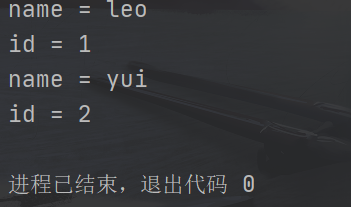 image-20201208091432594